> For the complete documentation index, see [llms.txt](https://academy.kryptomon.co/the-kryptomon-academy-1/llms.txt). Markdown versions of documentation pages are available by appending `.md` to page URLs; this page is available as [Markdown](https://academy.kryptomon.co/the-kryptomon-academy-1/kmon-genesis/kryptomon-level-migration.md).
# Kryptomon Level Migration
Fastest way of Training Kryptomon
Hello Trainers! Uncover with us the latest hot topic in Kogaea, Training Level Migration! It is not as complicated as it sounds, and we are here to explore what it means and how it can benefit you and your Kryptomons. Now, grab your favorite drink, and let’s dive into it!
### **CRACKING THE CODE OF TRAINING LEVEL MIGRATION:**
For Kryptomons, leveling up isn't just a matter of grinding through numbers—it's a testament to the blood, sweat, and code your digital creatures endure in the training arena. The path to the next level isn't a linear walk in the park; it's a strategic climb where the number of training sessions becomes your key to unlocking new dimensions of strength.
### **TYPES OF MIGRATIONS AND COST**
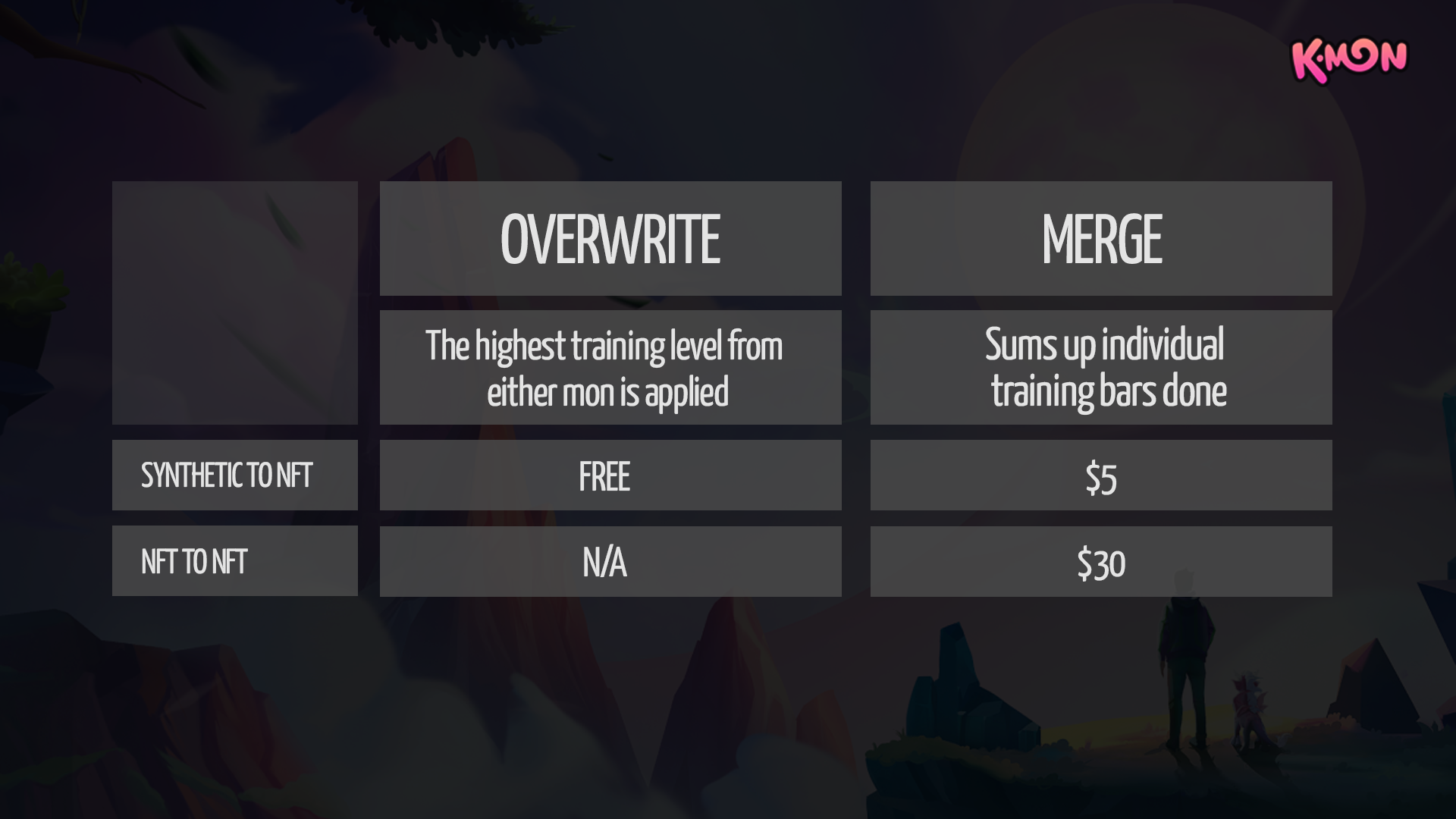
There are two different types of migration. You can **merge** training progress, or **overwrite** it.
Merge is possible between NFTs <> NFTs and NFT <>Synthetic Kryptomons. Overwrite is only possible for Synthetic to a NFT Kryptomon. Be aware, it's not for the faint hearted.. Synthetic Kryptomons don't survive the transfer and get burned.
Difference between Overwrite and Merge
### **TRAINING TRANSFER IN HYPERDRIVE:**
It's all about the numbers. Each trainable parameter demands 256 training sessions for a complete evolution but how does it impact in each type of migration? Check the overview below!
Migration Cheatsheet
{% hint style="info" %} Synthetic kryptomon get burned while NFT Kryptmon's level get reset to 0
{% endhint %}
### **READY TO START YOUR JOURNEY?**
1. Head over to the [Trainer Hub and go to your Kryptomons](https://hub.kryptomon.co/kryptomons)
2. Select the Kryptomon that you want to merge or overwrite
3. Select 'Migrate Levels'
4. Select Kryptomon you want to transfer to
5. Select type of migration (overwrite or merge)
6. Check if all is good, and hit migrate
7. Pay the fee (if there is any)
8. Ur good to go!
{% hint style="info" %} Make sure to log into Genesis before trying Level Migration
{% endhint %}
Have any questions? Head over to our [Telegram](https://t.me/kryptomonofficial) or [Discord](https://discord.gg/kmon-game-saga-838723081395634197).